Most people treat LinkedIn like a digital resume. A few are using it like a publishing platform — and those are the people getting hired, consulted, and followed by tens of thousands.
The LinkedIn creator program isn’t a single button you press. It’s a layered system of tools, settings, and algorithmic signals that, when used together, change how the platform distributes your content. The difference between someone who posts and disappears and someone who builds real authority on LinkedIn comes down to understanding how those layers work.
This guide covers exactly that: what the program includes, how to activate every tool in 2026, which creator features drive actual results, and the mistakes that are quietly killing reach for most users.
What Is the LinkedIn Creator Program — and Who Is It For?
The LinkedIn creator program is a set of content tools, profile settings, and optional accelerator initiatives that help professionals build a public audience on the platform. In short, it shifts your LinkedIn profile from connection-first to content-first, so people follow your ideas rather than just your career history.
LinkedIn launched what it originally called “Creator Mode” in March 2021. It started as an invite-only feature for Premium users. By early 2024, LinkedIn removed the standalone Creator Mode toggle and quietly did something more significant: it opened almost all creator features to every member, free or paid. As of 2026, any user can access newsletters, enhanced analytics, and follow-first profile settings through their account without spending a dollar.
That shift matters because it means the barrier to entry is zero. What separates successful creators from everyone else is no longer access — it’s strategy.
There are two distinct creator tiers worth knowing:
| Tier | Who It’s For | How You Join | Key Benefit |
|---|---|---|---|
| Creator Tools (All Users) | Any LinkedIn member | Activate via Settings & Privacy | Newsletters, analytics, Follow button, enhanced profile layout |
| Creator Accelerator Program | Established creators with a track record | Competitive application (cohort-based) | $15,000 grant, dedicated Creator Manager, distribution amplification |
The tools tier is available to everyone right now. The Accelerator is a selective 6-week incubator — Lincoln’s version of a creator residency — that surfaces a small cohort of creators for platform-level amplification. Most people reading this guide should focus on the tools tier first and treat the Accelerator as a longer-term target.
How to Activate LinkedIn Creator Tools in 2026 (Step by Step)
Activating the creator feature set takes under two minutes. Here is the exact process as of mid-2026:
- Go to Settings & Privacy — Click your profile photo in the top-right corner, then select “Settings & Privacy” from the dropdown.
- Click “Visibility” — In the left sidebar, select the Visibility tab.
- Scroll to “Followers” — Locate the Followers section within Visibility settings.
- Toggle “Make follow primary” to On — This replaces the default “Connect” button on your profile with a “Follow” button, which is the foundational shift that unlocks creator-oriented distribution.
- Update your “Featured” section — Go back to your profile and pin your best-performing post, newsletter, or content piece. This is the first thing visitors see after your headline.
- Choose up to 5 topic areas — Under your profile introduction, LinkedIn allows you to list the subjects you write about. Pick specific topics, not broad ones. “Revenue Operations” performs better than “Business.”
- Turn on Newsletter access — From your profile, click “Write article,” then look for the newsletter creation option. Publishing your first newsletter issue activates subscriber notifications for all future editions.
That’s the complete activation flow. Note that the old process of toggling a “Creator Mode” switch no longer exists — LinkedIn retired it in early 2024 and distributed most of its functions across general profile settings. If you read an older guide that tells you to search for a “Creator Mode” toggle, the information is outdated.
Which LinkedIn Creator Features Actually Move the Needle?
Once creator tools are active, the question becomes which ones are worth your attention. Not all features deliver equally. Based on the 2026 algorithm data and creator analytics reports, three stand out as genuinely high-leverage.
LinkedIn Newsletters
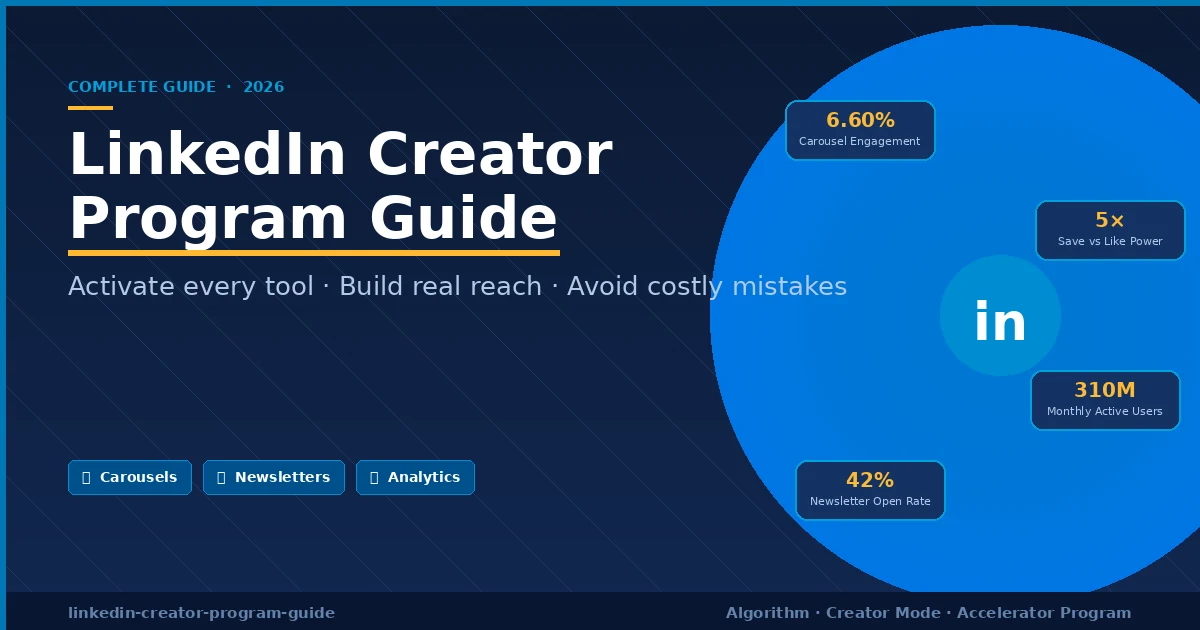
LinkedIn Newsletters have a 42% average open rate — more than twice the industry benchmark for email newsletters. That number is remarkable because it means your subscribers are actually reading what you send.
The mechanic is simple but powerful: every time you publish a newsletter issue, every subscriber gets an in-app notification and, depending on their settings, an email. That means your content reaches people directly, bypassing the algorithm entirely. In a platform environment where organic post reach has dropped roughly 50% since 2024, having a direct subscriber channel is a genuine competitive advantage.
In my review of top LinkedIn creators in 2026, every account growing faster than 5,000 followers per quarter either runs a newsletter or publishes long-form video — and most do both.
Document Posts (Carousels)
Document posts — PDFs uploaded natively to LinkedIn and displayed as swipeable carousels — generate the highest engagement rate of any format on the platform in 2026, at 6.60% on average. Text-only posts sit around 4%, and single images underperform text by about 30%.
The reason carousels outperform is mechanical: each swipe registers as a dwell-time signal. The 2026 algorithm uses dwell time as its primary distribution signal — a post someone reads for 30 seconds outranks one that collected 50 fast likes. Carousels force sustained attention, which the algorithm rewards with wider reach.
The best-performing document posts share a common structure: 8 to 10 slides, a strong visual hook on slide one, a clear framework or step-by-step process in the middle, and a direct takeaway or call-to-action on the final slide.
Creator Analytics
Since 2024, enhanced analytics are available to all users. What changed in 2026 is depth: you can now see audience breakdown by industry, seniority level, and geography — and you can track follower growth post by post.
This data is genuinely useful for one specific purpose: understanding which content brings in the right audience, not just any audience. A post that generates 10,000 impressions from interns doesn’t serve a consultant targeting CFOs. Analytics let you course-correct before you’ve wasted months creating for the wrong crowd.
LinkedIn Live
Live video on LinkedIn consistently outperforms standard video by a significant margin, primarily because LinkedIn notifies your followers before and during the broadcast. The catch: LinkedIn requires you to apply for Live access separately, and approval can take up to 30 days. Apply as soon as you activate your creator settings so it’s available when you’re ready.
How to Build Real Reach with the 2026 LinkedIn Algorithm
The LinkedIn algorithm went through its most significant overhaul in early 2026. Understanding the new rules is the difference between growing and grinding.
The core shift: LinkedIn moved from a Relationship Graph (showing you content from people you know) to an Interest Graph (showing you content based on what you engage with). Today, only about 31% of the average LinkedIn feed comes from first-degree connections. About 25% comes from second and third-degree connections. Roughly 10% is suggested content from people the algorithm has decided you’d find relevant.
This matters enormously for creators. Building a large network and posting to it is no longer the primary growth mechanism. What drives reach now is topical authority — consistent, expert-level content on a defined subject that trains the algorithm to route your posts to the right professional audience.
Here is what the data shows actually works in 2026:
Post in the first 60 minutes LinkedIn tests every new post with 2 to 5% of your network in the first hour. If that small group engages meaningfully, distribution expands. Only 5% of posts that underperform in the first hour recover to reach broader audiences. The implication: post when your audience is online, then respond to every comment in that window. The top 1% of creators reply to 134 comments per week on average.
Saves outweigh likes One save drives approximately five times more reach than a like. A save signals to the algorithm that your content has lasting reference value — exactly what the 2026 system is designed to amplify. Design content that people want to return to: frameworks, checklists, process breakdowns.
Keep external links out of the post body Posts with external links see roughly 40 to 50% less reach than identical posts without them. If you need to share a link, put it in the first comment. As of early 2026, even the first-comment workaround has been partially penalized on some post types, so the cleanest approach is to create content that doesn’t require an external link at all.
Use 0 to 3 hashtags Posts without hashtags now outperform posts with hashtags by 5 to 10% on average, according to Richard van der Blom’s 2026 Algorithm Report. If you do use hashtags, stick to niche-specific ones with between 50K and 500K followers. Generic tags like #Leadership or #Success actively confuse content classification.
Post 3 to 5 times per week Individual creators see their strongest results at this frequency. Beyond 7 posts per week, the algorithm begins deprioritizing accounts that appear spammy. The quality-versus-quantity tradeoff is real: one well-researched carousel outperforms five thin text posts in both immediate reach and long-term follower growth.
Common LinkedIn Creator Mistakes That Kill Reach
Most creators aren’t losing reach because they’re doing something obviously wrong. They’re losing it because they’re still following advice that worked two years ago.
Running engagement pods Engagement pods — informal groups that like and comment on each other’s posts to game distribution — are effectively dead. LinkedIn’s AI systems now detect reciprocal engagement patterns and apply shadowbans without notification. Accounts in active pods have seen reach drop from thousands to hundreds of impressions overnight. The risk is no longer worth any short-term benefit.
Treating the company page as the primary channel Personal profiles now receive approximately 65% of LinkedIn feed allocation. Company pages receive around 5%. This isn’t a temporary imbalance — it’s a structural decision by LinkedIn that reflects how users actually engage. CEO content generates four times more engagement than average posts. If you’re investing most of your content energy into a company page, you’re working against the platform’s architecture.
Posting about everything The 2026 algorithm identifies what it calls a “topic DNA” for each profile — a cluster of subjects you consistently post about. A professional who rotates between regulation, leadership, parenting, and travel is asking the algorithm to classify them as four different people. The result is smaller, inconsistent reach for every post. This doesn’t mean becoming one-dimensional; it means finding the connecting thread between your interests and making it clear in your content.
Using AI-generated content without substantial editing Research from Brixon Group analyzing over 500 B2B profiles found that AI-generated content receives 47% less organic reach than human-authored content. The algorithm detects formulaic sentence structures, generic transitions, and content that lacks the personal specificity that makes a post quotable. AI is a useful drafting tool, but the final output needs a clear human voice and first-person perspective to perform.
Ignoring the profile setup Many creators spend hours on content strategy and minutes on their profile. That’s backwards. In 2026, your LinkedIn profile is the conversion layer for every piece of content you publish. If someone discovers a strong post and clicks your name, a weak profile loses that follower. The Featured section — what appears first on your profile after your headline — should always show your single strongest piece of work.
Frequently Asked Questions
What is the LinkedIn creator program in 2026? The LinkedIn creator program is a set of profile tools and features — including newsletters, enhanced analytics, and follow-first profile settings — available to any LinkedIn member. A separate, competitive Creator Accelerator Program also offers grants and platform support to a small cohort of established creators each cycle.
Is LinkedIn Creator Mode still available in 2026? The original Creator Mode toggle was removed in early 2024. However, all the features it unlocked — newsletters, enhanced analytics, follow-first profiles, and the Featured section — are now available to all users through Settings & Privacy without needing to activate a separate mode.
How do I join the LinkedIn Creator Accelerator Program? The Accelerator is application-based and runs in cohort cycles. Applicants submit through LinkedIn’s official creator pages, provide social media links and a content concept, and wait three to five business days for review. The program has historically been open to creators with demonstrated audience growth and consistent publishing records.
Does Creator Mode boost reach automatically? No. Activating creator tools gives you access to features, not algorithmic shortcuts. The 2026 algorithm rewards dwell time, topic consistency, and genuine engagement. Creator tools enable better content execution — newsletters, carousels, live video — but content quality and publishing consistency are the actual reach drivers.
How many times should I post per week on LinkedIn? Research consistently shows 3 to 5 times per week as the optimal frequency for individual creators. At this cadence, the algorithm rewards consistency without deprioritizing your account for over-posting. Posting fewer than twice per week slows growth significantly; posting more than seven times typically leads to per-post reach decline.
What content format gets the most reach on LinkedIn in 2026? Document posts (PDF carousels) generate the highest engagement rate at 6.60% on average. Infographics have become the most common format among top-performing creators and achieve roughly three times the reach of text-only posts. Native video drives higher dwell time but requires stronger production to stand out.
How do LinkedIn Newsletters work for creators? When you publish a newsletter issue, every subscriber receives an in-app notification and, in many cases, an email alert. This bypasses the feed algorithm entirely. LinkedIn Newsletters average a 42% open rate, making them one of the most reliable distribution channels on the platform for creators who want predictable reach.
Can you make money through the LinkedIn creator program? Direct platform monetization is limited — LinkedIn does not pay creators per view the way YouTube does. However, top creators use the platform to generate consulting clients, speaking engagements, course sales, and brand partnerships. The top 1% of LinkedIn creators earn between $15,000 and $250,000 or more annually through these indirect channels, according to 2026 creator economics data.
Conclusion
The LinkedIn creator program in 2026 is less a formal program and more a strategic operating mode: a specific combination of profile settings, content formats, and publishing habits that the platform’s algorithm consistently rewards.
The fundamentals are clear. Activate creator tools through your Visibility settings. Build toward newsletters and carousels as your primary formats. Post three to five times per week on a defined topic area. Respond to every comment in the first hour. Treat saves as your most important engagement signal and design content accordingly.
The creators building real audiences on LinkedIn right now aren’t doing anything exotic. They’re doing the fundamentals better than everyone else — and they’re doing them consistently.
Start with one newsletter issue this week. Pick the single most useful thing you know about your professional field, write it clearly in 500 words, and publish it. That is a more effective first move than any other tactic in this guide.
Start your day smarter—our expert articles are loaded with insights worth reading.